
Introduction
If your Android phone keeps restarting over and over again, you’re not alone. This is one of the most common problems Android users face, and it can happen at the worst possible time — during a call, while typing a message, or even when your phone is just sitting idle on a table.
An Android phone keeps restarting for many reasons. Sometimes a software update goes wrong. Sometimes a bad app causes a conflict. Other times, a worn-out battery or overheating triggers the phone to randomly restart without any warning. Whether your phone keeps restarting every few minutes or once every hour, it disrupts everything.
The good news is that most Android restart loop problems are fixable at home. This step-by-step guide covers 10 proven solutions to fix an Android phone that keeps restarting — starting with the easiest methods first. No tech skills required.
Quick Answer
When your Android phone keeps restarting, start by force restarting the device, then boot into Safe Mode to check if a third-party app is causing the issue. If your phone keeps restarting even in Safe Mode, clear the cache partition through Recovery Mode. If nothing else works, perform a factory reset after backing up your data. These steps resolve the Android phone restarting problem for over 90% of users.
Why Your Android Phone Keeps Restarting
Before jumping into fixes, it helps to understand why your Android phone keeps restarting in the first place. Knowing the cause lets you choose the right solution faster.
Here are the most common reasons your phone keeps restarting on its own:
- Software bugs or glitches — A buggy app or a failed system update creates conflicts that force your Android phone to keep restarting.
- Low or damaged battery — When your battery cannot deliver stable power, your phone randomly restarts or shuts down unexpectedly.
- Overheating — Excessive heat activates a safety feature that causes the phone to restart itself to cool down and prevent hardware damage.
- Corrupted cache files — Temporary system data becomes corrupted over time and leads to instability, causing an Android restart loop.
- Faulty hardware — A stuck power button, damaged charging port, or failing motherboard can trigger the phone to keep rebooting.
- Insufficient storage — When storage is critically full, your Android operating system cannot function properly, and the phone keeps restarting as a result.
- Malware or rogue apps — Poorly coded or malicious apps crash your system, making your Android phone keep restarting repeatedly.
In most cases, when an Android phone keeps restarting, the root cause is software-related — and completely fixable at home.
How to Fix Android Phone Keeps Restarting (Step-by-Step Methods)
Fix 1: Force Restart Your Phone
Why this works: A force restart clears temporary memory and kills frozen processes. If your Android phone keeps restarting due to a minor software glitch, this simple step often resolves it instantly.
Steps:
- Press and hold the Power button and the Volume Down button simultaneously.
- Keep holding both buttons for 10–20 seconds.
- Your phone will vibrate, the screen will go black, and it will power back on.
- Release the buttons and wait for normal startup.
- Monitor your phone. If it stops restarting, the issue was a temporary glitch.
Samsung Galaxy users: On some models, hold Power + Volume Up instead. On older Samsung devices with removable batteries, pull out the battery, wait 30 seconds, and reinsert it.
Fix 2: Charge Your Battery Properly
Why this works: A weak or degraded battery is a top reason an Android phone keeps restarting on its own. If your battery cannot maintain a stable charge, your phone will reboot whenever it drops below a certain threshold.
Steps:
- Plug your phone into its original charger or a certified replacement.
- Use a wall outlet — avoid laptop USB ports and car chargers for now.
- Let the phone charge to at least 50% without interruption.
- While charging, observe whether the phone keeps restarting.
Signs your battery is failing:
- Battery percentage jumps erratically (e.g., 45% to 10% suddenly)
- Phone only restarts when unplugged from the charger
- Phone takes much longer to charge than it used to
- Back of the phone appears swollen or bulging
If these signs match, your battery needs professional replacement.
Fix 3: Check for Overheating
Why this works: Android devices are programmed to restart automatically when internal temperatures exceed safe levels. If your phone randomly restarts during gaming, video calls, or navigation, overheating is likely the cause.
Steps:
- Touch the back of your phone. Is it unusually hot?
- Remove your phone case immediately — thick cases trap heat.
- Close all running apps by tapping the Recent Apps button and swiping everything away.
- Move your phone away from direct sunlight and heat sources.
- Stop charging the phone temporarily.
- Wait 10–15 minutes for it to cool down.
- Use the phone normally and see if the Android phone keeps restarting.
Tip: Budget devices like Xiaomi Redmi, Samsung Galaxy A series, and Motorola G series are more prone to overheating under heavy use because of less powerful cooling systems.
Fix 4: Boot Into Safe Mode
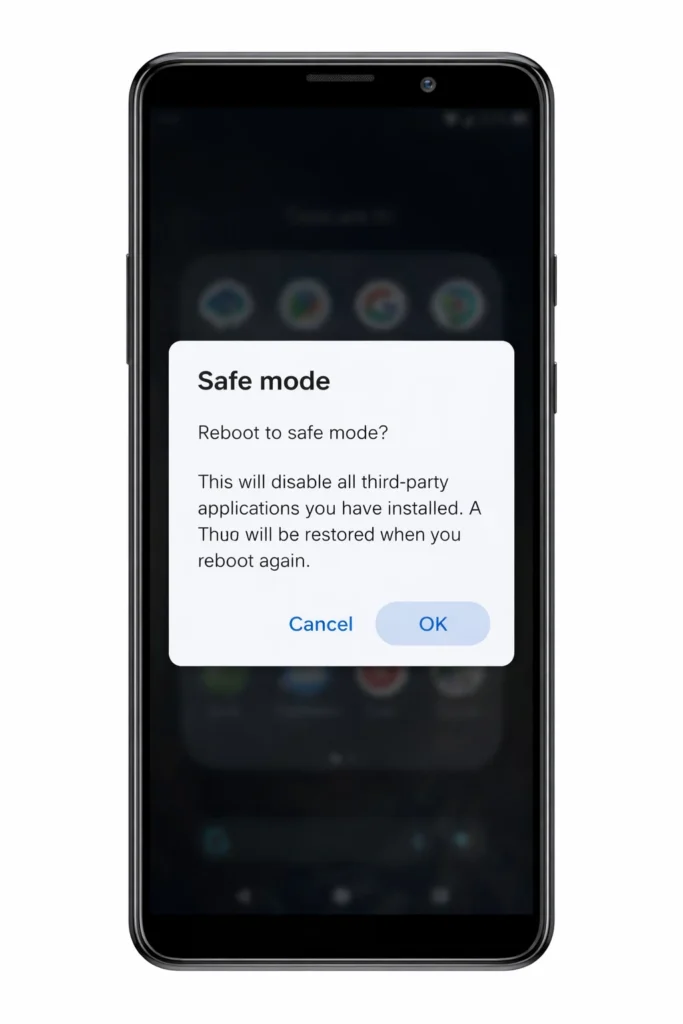
Why this works: Safe Mode loads only the built-in system apps and disables all downloaded apps. If your Android phone keeps restarting because of a problematic third-party app, the restarts will stop in Safe Mode.
Steps:
- Press and hold the Power button until the power menu appears on screen.
- Tap and hold the “Power Off” option.
- A prompt will appear: “Reboot to Safe Mode.”
- Tap OK.
- Your phone restarts with “Safe Mode” shown in the bottom corner of the screen.
- Use your phone for 15–30 minutes and observe.
Results:
- ✅ Phone is stable in Safe Mode → A third-party app is causing your Android phone to keep restarting. Proceed to Fix 6 to find and remove it.
- ❌ Phone keeps restarting in Safe Mode → The problem is system-level or hardware-related. Skip to Fix 7.
Fix 5: Update Your Android Software
Why this works: Manufacturers regularly release updates that fix known bugs causing phones to randomly restart. If your Android keeps restarting after a previous update, a newer patch may specifically address the issue.
Steps:
- Open Settings.
- Scroll to Software Update (Samsung) or System > System Update (Pixel, Xiaomi, OnePlus).
- Tap Check for Updates.
- If an update is available, tap Download and Install.
- Keep your phone connected to Wi-Fi and plugged into a charger during the update.
- After the update completes, check if your phone still keeps restarting.
⚠️ Never turn off your phone during a software update. This can corrupt the operating system and make the restart loop worse.
Fix 6: Uninstall Suspicious Apps
Why this works: If Safe Mode confirmed a third-party app is why your Android phone keeps restarting, removing the guilty app permanently solves the problem. Focus on apps you installed right before the restarting issue started.
Steps:
- Open Settings > Apps (or App Management).
- Sort by Most Recently Installed if the option exists.
- Tap on a recently installed or suspicious app.
- Tap Uninstall.
- Restart your phone and monitor whether the phone keeps restarting.
- If the problem continues, uninstall the next most recent app and repeat.
Common culprit apps:
- Apps downloaded outside the Google Play Store (APK files)
- “RAM cleaner” or “phone booster” apps
- Free VPN apps
- Apps requesting excessive permissions
Fix 7: Clear Cache Partition
Why this works: The system cache stores temporary files that help Android run smoothly. When these files become corrupted, your Android phone keeps restarting or gets stuck in a restart loop. Clearing the cache partition removes these damaged files without deleting your personal data.
Steps:
- Turn off your phone completely.
- Press and hold Power + Volume Up simultaneously.
- Release the buttons when you see the Recovery Mode menu.
- Use the Volume buttons to navigate and the Power button to select.
- Highlight and select Wipe Cache Partition.
- Select Yes to confirm.
- Select Reboot System Now.
- After reboot, check if your Android phone keeps restarting.
Samsung Galaxy: On older Samsung models, the combination may be Power + Volume Up + Home/Bixby button. On newer Galaxy S and Galaxy A phones, use Power + Volume Up.
Fix 8: Remove the SIM Card and SD Card
Why this works: A defective SIM card or corrupted SD card can cause hardware communication errors that make your phone keep restarting. Removing them helps isolate the problem.
Steps:
- Power off your phone completely.
- Use the SIM ejector tool (or a paperclip) to open the SIM tray.
- Remove both the SIM card and SD card (if one is installed).
- Power on the phone without the cards inserted.
- Use the phone for 15–30 minutes.
- If the Android phone stops restarting, reinsert the SIM card first and test. Then insert the SD card separately.
- Whichever card triggers the restart, replace it.
Fix 9: Check Your Power Button
Why this works: A physically stuck or damaged power button continuously sends restart signals to the system. This is a commonly overlooked reason an Android phone keeps restarting, especially on older devices or phones that have been dropped.
What to check:
- Press the power button several times. Does it feel stuck, loose, or gritty?
- Does the phone restart specifically when you press near the button area?
- Is there visible dirt or debris around the button?
What to do:
- Gently clean around the power button with a dry toothbrush or compressed air.
- If the button is physically damaged, take your phone to a certified repair center.
Fix 10: Factory Reset Your Phone (Last Resort)
Why this works: A factory reset completely erases your phone and restores it to its original factory state. This eliminates every possible software problem that could cause your Android phone to keep restarting — corrupted files, bad app data, system errors, everything.
⚠️ WARNING: A factory reset deletes ALL data — photos, apps, contacts, messages. Back up everything first.
How to back up:
- Go to Settings > Google > Backup > Turn on Back up to Google Drive.
- Transfer important photos and files to a computer or cloud storage.
Steps to factory reset:
- Open Settings.
- Tap General Management > Reset (Samsung) or System > Reset Options (Pixel, Xiaomi, OnePlus).
- Tap Factory Data Reset.
- Read the information and tap Reset or Erase All Data.
- Enter your PIN or password.
- Your phone will restart and begin the factory reset process.
- After setup, monitor whether the phone keeps restarting.
If you cannot access Settings because the phone keeps restarting:
- Turn off the phone.
- Boot into Recovery Mode (Power + Volume Up).
- Select Wipe Data/Factory Reset.
- Confirm and select Reboot System Now.
🔧 Troubleshooting Tips
| When Your Phone… | Try This Fix First |
|---|---|
| Keeps restarting when using one specific app | Uninstall that app (Fix 6) |
| Keeps restarting while charging | Switch charger and cable (Fix 2) |
| Randomly restarts after a software update | Clear cache partition (Fix 7) |
| Keeps restarting every few minutes nonstop | Safe Mode (Fix 4) → Factory Reset (Fix 10) |
| Gets very hot before it restarts | Cool down + close apps (Fix 3) |
| Restarts only when SIM card is inserted | Replace SIM card (Fix 8) |
| Is more than 3 years old with a swollen back | Battery replacement needed — visit a repair shop |
| Is stuck in a restart loop and won’t reach home screen | Recovery Mode → Factory Reset (Fix 10) |
Common Mistakes to Avoid When Your Android Phone Keeps Restarting
❌ Installing “phone cleaner” or “booster” apps — These apps are notorious for causing the exact restarting problems they claim to fix.
❌ Ignoring software updates — Delayed updates leave known restart-causing bugs unpatched on your Android phone.
❌ Using cheap, uncertified chargers — Inconsistent power delivery damages batteries and causes phones to randomly restart.
❌ Filling storage to 100% — Android needs breathing room. A full phone is an unstable phone that keeps restarting.
❌ Jumping straight to factory reset — Always try simpler fixes first. Many users erase everything unnecessarily when a cache wipe or app removal would have fixed the Android phone restarting issue.
❌ Assuming it’s unfixable — Most Android restart loop problems are software-based and completely solvable with this guide.
Additional Tips to Prevent Your Android Phone From Restarting
Once you’ve fixed your Android phone that keeps restarting, follow these habits to prevent the problem from coming back:
- Keep your software updated. Enable auto-updates under Settings > Software Update to patch bugs that cause phones to restart.
- Only install apps from the Google Play Store. Avoid sideloading APK files from unknown websites.
- Restart your phone manually once a week. A regular reboot clears temporary files and prevents the buildup that leads to random restarts.
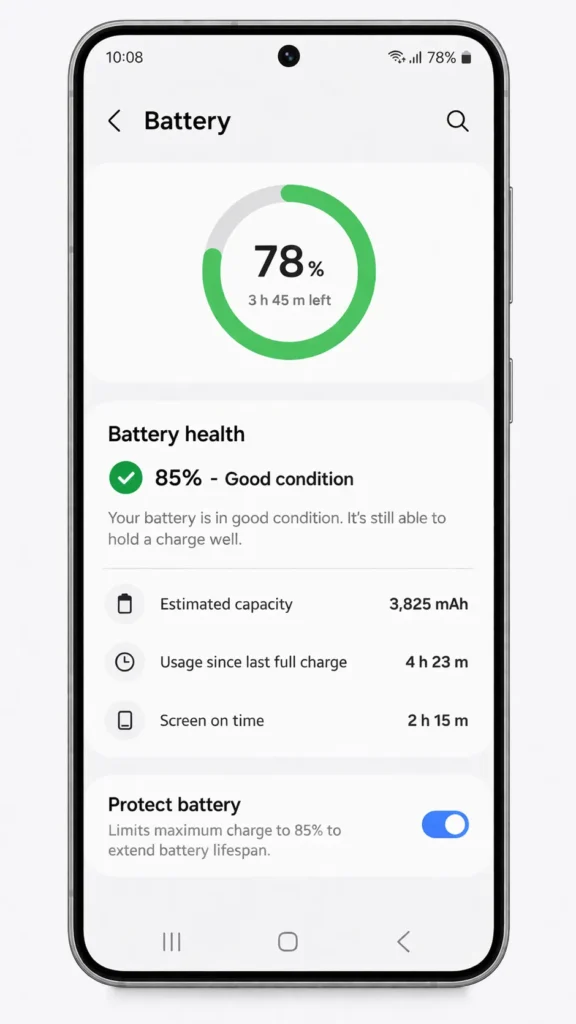
- Monitor battery health. On Samsung, check Settings > Battery > Battery Health. Replace the battery if health falls below 80%.
- Avoid overheating. Don’t leave your phone in hot cars, don’t game while charging, and remove thick cases during heavy use.
- Clear app caches regularly. Go to Settings > Apps > select an app > Storage > Clear Cache.
- Maintain at least 2–3 GB of free storage at all times to keep your Android system running smoothly.
- Avoid sideloading apps or granting unnecessary permissions that could destabilize your system.
Frequently Asked Questions
Why does my Android phone keep restarting by itself?
Your Android phone keeps restarting by itself most commonly due to software glitches, a degraded battery, overheating, corrupted system cache, or a problematic third-party app. To pinpoint the cause, boot into Safe Mode first. If the phone stops restarting in Safe Mode, a downloaded app is the culprit. If the phone keeps restarting even in Safe Mode, try clearing the cache partition or performing a factory reset.
How do I fix my Samsung phone that keeps restarting?
If your Samsung phone keeps restarting, force restart it by holding Power + Volume Down for 15 seconds. Next, boot into Safe Mode and check for rogue apps. If the Samsung phone keeps restarting in Safe Mode, clear the cache partition via Recovery Mode (Power + Volume Up). Also check for updates under Settings > Software Update. Samsung’s built-in Samsung Members app also has a diagnostic tool that can detect hardware issues causing the restart loop.
Can a bad battery cause my Android phone to keep restarting?
Absolutely. A failing battery is one of the top hardware reasons an Android phone keeps restarting. Symptoms include sudden battery percentage drops, the phone dying at 20–30%, a swollen back cover, and restarts that only happen when unplugged. If your phone is older than 2–3 years, the battery may have degraded enough to cause these random restarts. Visit an authorized service center for a battery replacement.
Will a factory reset fix my Android phone that keeps restarting?
Yes, in most cases a factory reset will fix an Android phone that keeps restarting due to software issues. It erases all data and returns the phone to its original state, eliminating corrupted files and app conflicts. However, if faulty hardware like a bad battery or stuck power button is causing the phone to keep restarting, a factory reset alone will not solve the problem. Always try simpler fixes before resorting to a factory reset.
When should I take my phone to a repair shop for the restarting problem?
If you have tried all software solutions in this guide — force restart, Safe Mode, cache wipe, software update, and factory reset — and your Android phone keeps restarting, the problem is almost certainly hardware-related. Take your phone to an authorized service center for professional diagnosis. Common hardware repairs for phones that keep restarting include battery replacement, power button repair, and motherboard inspection.
Conclusion
An Android phone that keeps restarting is a frustrating problem, but it is almost always fixable. By working through the 10 solutions in this guide — from a simple force restart to a full factory reset — you can identify and resolve the exact cause of your phone’s restarting issue.
Start with the easy fixes first. A force restart, proper charging, and Safe Mode test solve the problem for the majority of users. If those don’t work, clearing the cache partition and removing suspicious apps are your next best steps. Save the factory reset for when nothing else works.
Remember: Always back up your data before a factory reset, keep your phone updated, and avoid unreliable third-party apps. These simple habits will dramatically reduce the chances of your Android phone restarting on its own ever again.
If all else fails and your phone keeps restarting after every fix, don’t delay — visit a certified repair center. A hardware issue caught early is cheaper to fix than one left ignored.
- Google Support — Troubleshoot Android device issues:
https://support.google.com/android/answer/7668719 - Samsung Support — Phone keeps restarting or freezing:
https://www.samsung.com/us/support/troubleshooting/ - Google Support — Reset Android device to factory settings:
https://support.google.com/android/answer/6088915




[…] Android Phone Keeps Restarting Fix: 10 Proven Solutions (2026 Guide) […]
[…] Android Phone Keeps Restarting Fix: 10 Proven Solutions (2026 Guide) […]